Your brand shows up in some AI answers but not others. Your scores aren't where you want them. This guide is for brands that already have a baseline and want to systematically improve their visibility, sentiment, and purchase intent in AI.
If you're starting from scratch, begin with our beginner's roadmap first.
The Gap Most Brands Don't Know About
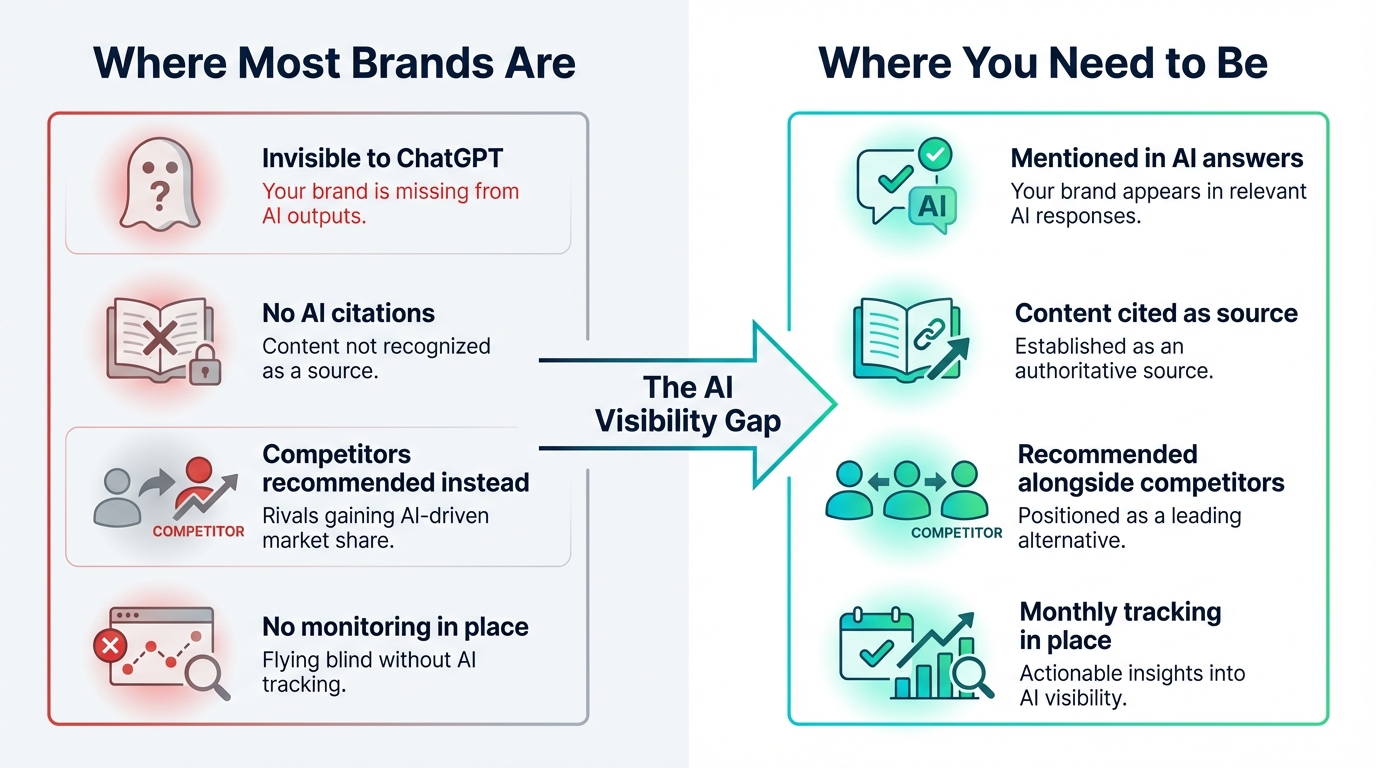
Here's something we see constantly: a brand scores well when someone asks AI "What is [brand]?" — recognition rates of 80-90% are common. But on the queries that actually drive new customers, like "best [category] tools" or "which [product type] should I use?", the same brand shows up maybe one in five times.
That gap between branded recognition and category discovery is where most of the lost opportunity lives. AI knows who you're, but it doesn't think of you when someone is shopping your category.
The steps below are designed to close that gap.
Step 1: Figure Out Where You Actually Stand
You can't improve what you haven't measured. Before changing anything, you need a clear picture of how AI treats your brand right now — and not just on one platform.
Ask ChatGPT, Gemini, Perplexity, Google AI Mode, and Google AI Overviews the kinds of questions your customers would ask. Three types matter most:
- Category queries: "Best [your category] tools" or "Top [your category] companies"
- Comparison queries: "[Your brand] vs [competitor]" or "Should I use [brand] or [competitor]?"
- Purchase queries: "Which [category] should I buy?" or "I need a [product type], what do you recommend?"
Pay close attention to the difference between AI mentioning your brand and AI recommending it. Being mentioned in passing ("there's also Brand X") is very different from being positioned as a top choice.
Each AI platform may treat your brand completely differently. You might score well on Gemini but barely exist on ChatGPT. That's why a per-provider breakdown matters — it tells you exactly where to focus. friction AI surfaces this automatically, showing your scores on each AI model side by side, along with the actual web search queries each model used to research your brand. Those queries alone can be eye-opening — more on that in Step 3.
For a visual walkthrough of this process, watch our video tutorial on checking AI visibility.
Step 2: Fix Your Website's AI Readiness
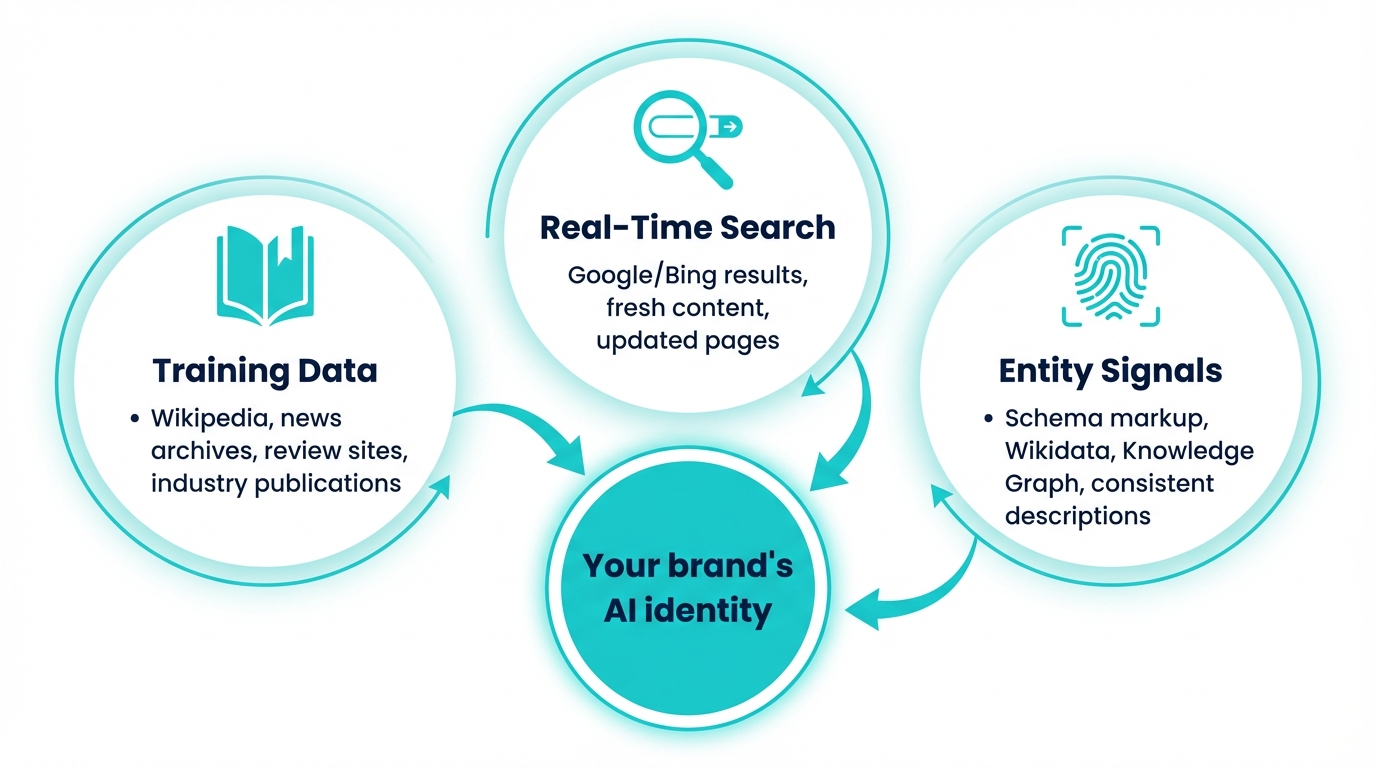
If AI bots can't access and understand your content, nothing else you do will matter. This is the foundation everything builds on.
Most brands focus on what their site says, but miss whether AI can actually read it. Common problems:
- Blocked crawlers: Your robots.txt or server configuration might be blocking AI agents like GPTBot, Google-Extended, or PerplexityBot. If AI can't crawl your pages, it can't cite them.
- Missing structured data: No Organization or Product schema means AI has to guess what your brand is instead of reading a clear definition. Google AI Mode and Gemini use schema markup to verify entity claims and assess source credibility, making it a foundation for AI citation eligibility even when no traditional rich result appears.
- Stale content: AI models notice freshness. If your pricing page hasn't been updated in a year or your blog's last post is from 2024, that's a trust signal going the wrong direction.
- Weak meta descriptions and headings: These are the first things AI retrieval systems scan when deciding whether to pull your page into a response.
friction AI's DCR audit checks all of this — it crawls your site and flags exactly what needs fixing, from missing schema to stale content to crawlability issues. Think of it as a technical checklist for AI readiness.
For a deeper look at entity mechanics, see why entity recognition is the hidden variable.
Step 3: Use the Keywords AI Is Actually Searching
This is something most brands don't realize: when you ask ChatGPT a question, it doesn't just think of an answer.
It runs web searches behind the scenes, using its own keywords. Those keywords may not be the ones you'd expect.
friction AI shows you the exact search queries each LLM used for every prompt. This is incredibly useful becuase it creates a direct pipeline to action:
- Extract the queries: See what keywords ChatGPT, Gemini, and Perplexity searched when answering prompts about your category
- Check your rankings: Are you showing up in the top results for those queries? If not, AI literally can't find you when it's building its answer
- Rank for them: Create or optimize content targeting those specific keywords. And here's the thing — it doesn't have to be your main landing pages. Blog posts, guest articles, and third-party content that mentions your brand work just as well. If a blog post ranking for "best IoT connectivity platforms" mentions your brand, AI will pick that up
This is where traditional SEO and AI visibility connect. The keywords AI searches are your new target keyword list.
Step 4: Improve Your Visibility Score
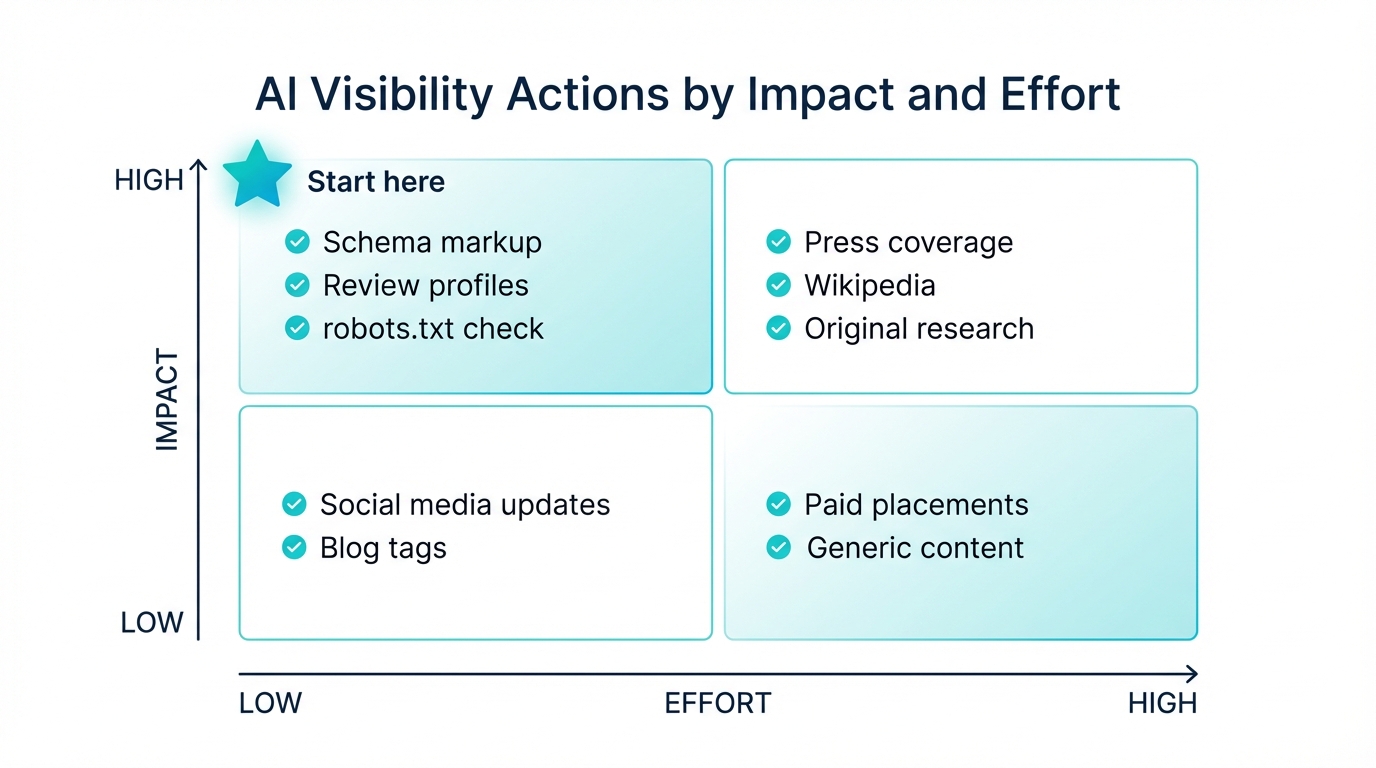
Visibility measures how often AI mentions your brand in relevant queries. If you're strong on branded queries but weak on discovery queries (wich most brands are), here's what to work on.
Create content AI wants to retrieve
AI models pull from content that gives clear, specific, factual answers. The formats that get retrieved most often:
- Comparison pages with honest pros and cons (not just "we're better")
- Definition and glossary pages for terms in your space
- Data-driven posts with original statistics or benchmarks
- How-to guides with clear step-by-step structure
Content with statistical citations gets 40% more visibility in generative engine outputs compared to content without supporting data.
Act on the specific sources AI cites
This is where it gets tactical. friction AI shows you the exact sources each AI model cited when discussing your category. Once you know the sources, the playbook depends on the source type:
- Reddit thread: Post a genuine, helpful reply in that thread. Don't spam — add real value, and mention your brand naturally if relevant
- Blog post or article: Reach out to the author about including or updating your brand in their coverage
- Review site (G2, Capterra, Trustpilot): Make sure your profile is complete, current, and actively collecting reviews
- Industry publication: Pursue earned coverage — pitch a story, offer expert commentary, or share original data
- Comparison page: If your brand isn't listed, contact the publisher. If it is listed with outdated info, request an update
If you see competitors being cited from G2 reviews and industry articles while your brand only shows up from your own blog, that tells you exactly what's missing. For the full list of high-impact sources, see the third-party sources AI models trust.
Optimize per platform
Each AI platform retrieves differently. What works for ChatGPT may not move the needle on Perplexity:
- How to rank in ChatGPT
- How to appear in Perplexity
- How to optimize for Google AI Overviews
- How to optimize for Google AI Mode
Step 5: Improve Your Sentiment Score
Sentiment measures how positively AI talks about your brand. You can be highly visible and still have a problem — if AI surfaces outdated complaints or frames you negatively, high visiblity actually hurts.
Find out what AI is actually saying
Ask each platform: "What are the pros and cons of [brand]?" and "What do users think about [brand]?" You might be surprised. AI often surfaces criticism you forgot about or didn't know existed.
friction AI breaks sentiment into sub-components — brand perception and customer experience — so you can see which dimension is dragging you down. A brand with strong perception but weak customer experience scores needs a different fix than one with the opposite pattern.
Trace problems to their source
AI sentiment reflects what the web says about you. When you spot a negative signal, trace it back. The platform shows you which sources AI cited in its response, complete with credibility scores. If a low-credibility forum post is shaping your sentiment, that's a different problem than a negative G2 review — and needs a different response.
Use the same source-type playbook from Step 4: respond to reviews, update outdated profiles, reach out to authors, and publish case studies that counter specific criticisms. For the full approach, see how to fix negative AI brand sentiment.
Step 6: Improve Your Purchase Intent Score
Purchase intent measures whether AI recommends your brand when someone is ready to buy. This is the metric that most directly drives revenue.
friction AI breaks this into two sub-components: direct intent (does AI recommend you when someone asks for your category?) and competitive positioning (how do you compare when AI evaluates you against alternatives?). Knowing which one is weak changes what you do about it.
Strengthen your positioning in buying contexts
AI recommends brands it can confidently associate with specific use cases. Your website needs to clearly state:
- Who your product is for (specific audience and use case)
- How you're different from alternatives (concrete advantages, not marketing fluff)
- Evidence that validates the purchase (reviews, case studies, customer counts)
Close the competitive gaps
friction AI's competitive gap analysis shows you exactly where competitors outperform you — which prompts they win on, which sources give them an edge, and how big the gap is. Getting listed on the comparison sites AI cites before recommending products directly improves your purchase intent score. For the complete framework, see how to improve your purchase intent in AI.
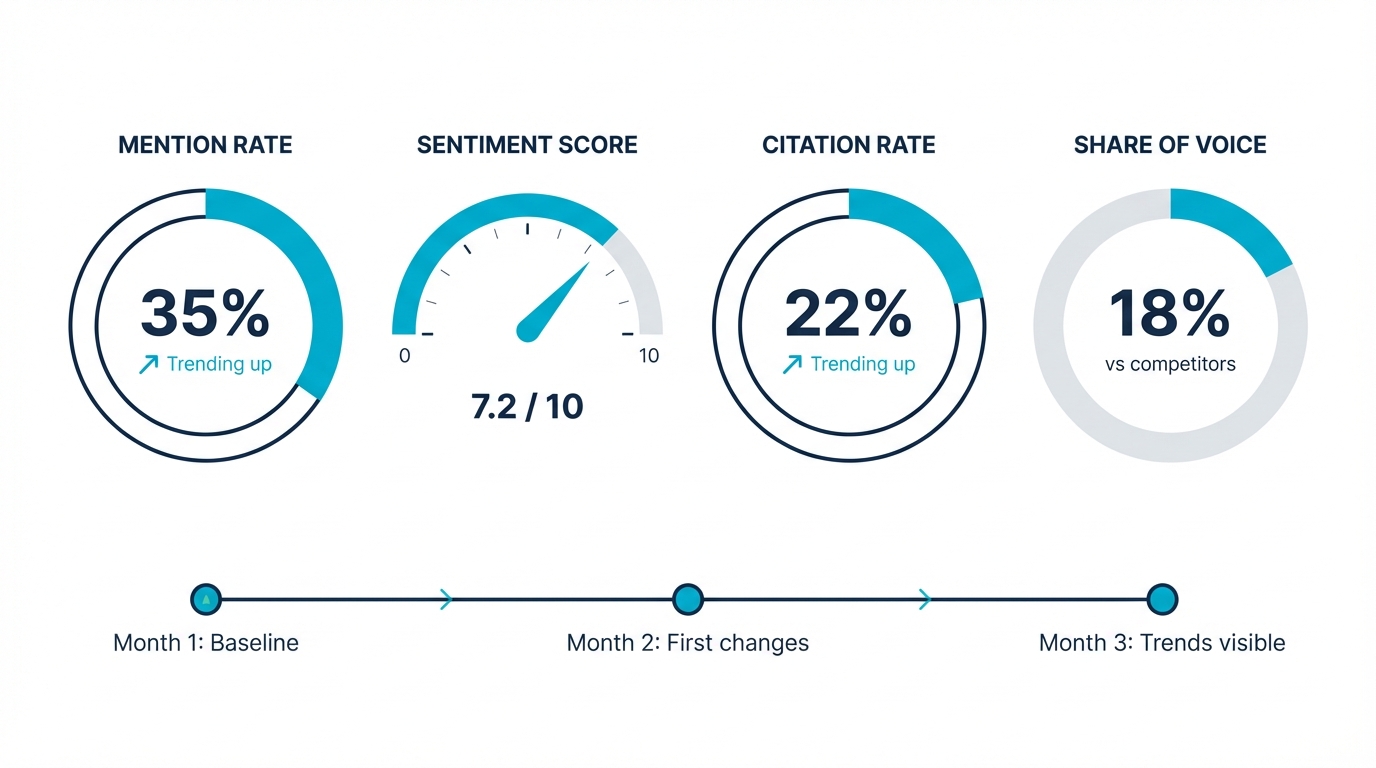
Step 7: Track What's Working (and What Isn't)
AI visibility improvements don't show up overnight. Perplexity refreshes in real time, but ChatGPT's training data can lag by months. You need to track changes over weeks and months, not days.
friction AI gives you trend lines across 7, 30, 90, and 180-day windows for every metric and sub-component. You can see whether your actions are actually moving scores, and on which platforms. The platform also surfaces prioritized action recommendations — specific next steps ranked by expected impact and effort — so you're not guessing at what to work on next.
Just like SEO, AI visibility isn't a one-time fix. It compounds. The brands that monitor, optimize, measure the change, and keep going are the ones that pull ahead. McKinsey projects $750 billion in US revenue will flow through AI search by 2028. The brands tracking their presence now will be significantly harder to displace later.
Frequently Asked Questions
How long does it take to see improvement in AI visibility scores?
Entity recognition and website readiness fixes usually register within 30-60 days. Visibility and sentiment improvements take 60-90 days to compound. Purchase intent is typically the slowest because it depends on third-party authority building over time.
My brand shows up for "What is [brand]?" but not for category queries. Why?
This is the most common pattern we see. AI recognizes your brand but doesn't associate you strongly enough with your category to recommend you on discovery queries. Focus on Steps 3 and 4 — rank for the keywords AI is searching, and get onto the third-party sources AI trusts for your category.
Can I improve my scores on just one AI platform?
You can, but foundational improvements — website readiness, third-party authority, structured content — tend to lift scores across all platforms at once. Platform-specific tactics add extra lift on top.
How do I know which improvements are actually working?
friction AI's per-provider breakdown shows you exactly which platforms responded to your changes. If you improved your G2 reviews and your ChatGPT sentiment went up but Perplexity stayed flat, that tells you something about each platform's retrieval patterns.
Related Articles
- Building AI Visibility from Scratch: A Beginner's Roadmap
- How to Measure AI Visibility: Key Metrics and KPIs
- What is AI Visibility? Definition, Examples & Why It Matters
- How to Get Your Content Cited by AI