Structured data refers to Schema.org markup, often implemented as JSON-LD, that helps search systems interpret key information about a page and its entities. It can support eligible rich results in Google Search and can make it easier for other systems to parse page meaning, but it is not a guaranteed path to being cited in AI answers.
Google explicitly states there is no special Schema.org markup required for AI Overviews or AI Mode. Structured data should be treated as semantic markup that clarifies what is already visible on the page, not as an AI ranking shortcut. It must match the visible content, and you should only use types like Organization, Article, Product, and SoftwareApplication when they accurately describe the page.
What structured data can and cannot do for AI search
What it can do - Help search systems understand eligible information on a page and enable supported rich results where applicable. - Reduce ambiguity about entities and page attributes by providing explicit machine readable statements that match visible content. - Improve consistency across your site when the same entities appear across multiple pages.
What it cannot do - It does not guarantee inclusion or citation in AI Overviews, AI Mode, or other AI generated answers. - There is no dedicated AI schema. Adding more markup does not automatically produce more AI visibility. - It cannot safely contradict, expand, or “upgrade” what the page actually shows. If the content is not visible, the markup should not claim it.
Official references: - https://developers.google.com/search/docs/appearance/ai-features - https://developers.google.com/search/docs/appearance/structured-data
Which Schema types to prioritize
Not all schema types are equally useful. Prioritize types that accurately describe your page and that you can keep consistent across your site.
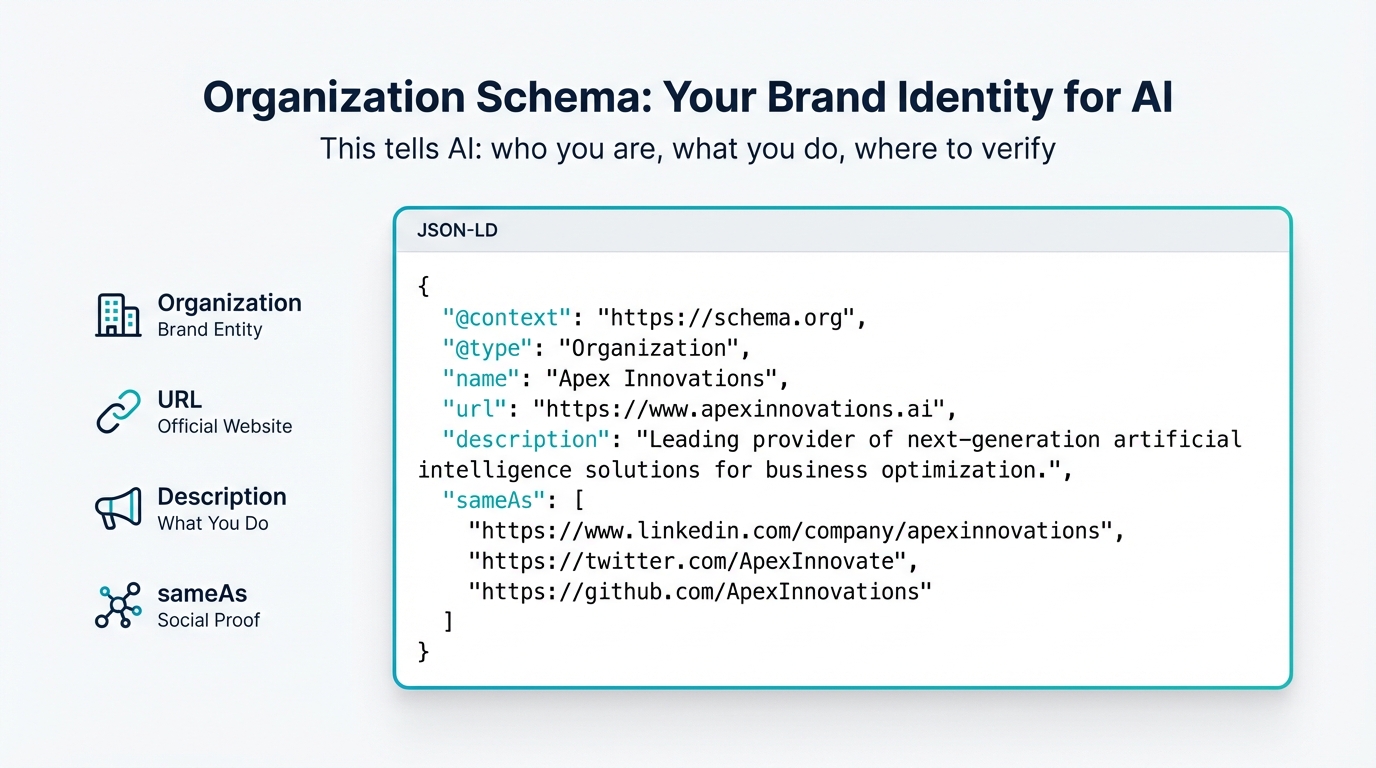
Organization schema
Use Organization markup when the page is truly describing your organization and the properties you include are reflected in visible content such as your About, Contact, and brand pages.
Typical properties teams maintain:
- name, url, logo, description
- foundingDate (only if it is stated on the site)
- sameAs (links to official profiles that represent your organization)
- contactPoint, areaServed (only if supported by visible copy)
Important constraint: do not treat sameAs as a place to list every directory. Include only legitimate profiles that are about your organization and that you control or that clearly represent you. If your site does not visibly support a claim, do not add it to JSON-LD.
Article schema
Use Article markup on pages that are clearly articles, such as blog posts, news, or editorial content. Article markup can help search systems understand the basic facts of a piece: title, author, publisher, and dates.
Include only what is true and visible, commonly:
- headline
- author (with a real author page if you have one)
- datePublished, dateModified (only if displayed or otherwise clearly presented on the page)
- publisher
- image
- description
- mainEntityOfPage
Reminder: structured data can help search systems understand information, but it does not guarantee AI citations.
Product schema
Use Product markup only on pages that are actually product detail pages, where the product being described is the visible focus of the page. Follow Google’s Product structured data guidance and keep every property aligned with what users can see.
Official reference: - https://developers.google.com/search/docs/appearance/structured-data/product
If your page is describing software that is offered as a product, make sure the page content supports the type you pick. If it is a software product page, SoftwareApplication can be appropriate, but only when it accurately describes the visible entity and content.
SoftwareApplication schema
SoftwareApplication is appropriate when the page is about a specific software application and includes the kind of details users expect such as what it does, platform, and offer details where applicable. Use it only if the page is visibly a software application page and the properties you provide match the page.
If you are unsure whether Product or SoftwareApplication fits better, choose the one that best matches the visible page intent and the entity you are describing, and don't force both unless it is truly justified by what the page presents.
FAQPage and HowTo schema: use with current Google limits in mind
Google’s support has changed: - HowTo rich results are deprecated in Google Search. - FAQ rich results are generally limited to authoritative government and health sites.
Official reference: - https://developers.google.com/search/blog/2023/08/howto-faq-changes
That does not mean you should never use these types, but it does mean you should not add them expecting Google rich results, and you should be extra strict about matching visible on page content.
If you include FAQPage markup: - Use it only on genuine FAQ pages where the questions and answers are visible to users. - Keep answers accurate, non promotional, and consistent with the page.
If you include HowTo markup: - Only use it when the page is a real step by step instructional guide with visible steps. - Do not add it as an “AI formatting” trick, especially given Google’s deprecation of HowTo rich results.
JSON-LD examples you can adapt safely
These examples are best treated as semantic markup patterns. Adjust them to match your real pages and remove any fields you cannot support with visible content.
Organization schema example
{
  "@context": "https://schema.org",
  "@type": "Organization",
  "name": "Your Brand Name",
  "url": "https://www.yourbrand.com",
  "logo": "https://www.yourbrand.com/logo.png",
  "description": "One-sentence description of what your brand does and who it serves.",
  "foundingDate": "2020-01-15",
  "founder": {
    "@type": "Person",
    "name": "Founder Name"
  },
  "sameAs": [
    "https://www.linkedin.com/company/yourbrand",
    "https://twitter.com/yourbrand",
    "https://en.wikipedia.org/wiki/Your_Brand"
  ],
  "contactPoint": {
    "@type": "ContactPoint",
    "contactType": "customer service",
    "email": "support@yourbrand.com",
    "url": "https://www.yourbrand.com/contact"
  },
  "areaServed": "US",
  "knowsAbout": [
    "Your primary topic",
    "Your secondary topic",
    "Your tertiary topic"
  ]
}
Notes for safe implementation:
- Do not add a Wikipedia or Wikidata URL unless it is real and about your organization.
- Include foundingDate and founder only if those details are shown on the site.
- Use knowsAbout only when it reflects what your organization demonstrably covers across the site.
FAQPage schema example
{
  "@context": "https://schema.org",
  "@type": "FAQPage",
  "mainEntity": [
    {
      "@type": "Question",
      "name": "What does your brand do?",
      "acceptedAnswer": {
        "@type": "Answer",
        "text": "Clear, concise answer that a system could extract and present directly."
      }
    },
    {
      "@type": "Question",
      "name": "How does your product compare to alternatives?",
      "acceptedAnswer": {
        "@type": "Answer",
        "text": "Factual comparison that reflects what your page actually states and supports."
      }
    }
  ]
}
Given current Google limitations on FAQ rich results, implement FAQPage markup primarily to clarify page semantics, not as a promise of enhanced search appearance. Ensure every Q and A is visible on the page and kept up to date.
Article schema example
{
  "@context": "https://schema.org",
  "@type": "Article",
  "headline": "Your Article Title",
  "author": {
    "@type": "Person",
    "name": "Author Name",
    "url": "https://www.yourbrand.com/team/author-name",
    "jobTitle": "Author's Title",
    "worksFor": {
      "@type": "Organization",
      "name": "Your Brand Name"
    }
  },
  "datePublished": "2026-03-15",
  "dateModified": "2026-03-28",
  "publisher": {
    "@type": "Organization",
    "name": "Your Brand Name",
    "logo": {
      "@type": "ImageObject",
      "url": "https://www.yourbrand.com/logo.png"
    }
  },
  "description": "Meta description that summarizes the article's key takeaway.",
  "image": "https://www.yourbrand.com/images/article-image.jpg",
  "mainEntityOfPage": "https://www.yourbrand.com/blog/article-slug"
}
Only include dateModified if you actually track and display meaningful updates. For author markup, make sure the author identity and role are supported by visible bylines and author pages where possible.
How Google uses structured data, and what that implies for AI features
Google’s structured data documentation is clear about its core role: structured data helps Google understand eligible information and enable supported rich results. It does not guarantee ranking improvements, and it does not guarantee that any AI feature will cite your page.
For AI Overviews and AI Mode specifically, Google states there is no special markup required. The practical takeaway is that your markup strategy should focus on: - Accuracy and consistency with the visible page - Choosing schema types that genuinely match the page intent - Maintaining the markup as your content changes
References: - https://developers.google.com/search/docs/appearance/ai-features - https://developers.google.com/search/docs/appearance/structured-data
Implementation rules that prevent the most common failures
Keep markup aligned with visible content
Structured data must match what users can see. If you add properties that are not supported by the page, you risk confusing systems that compare markup with page text and UI elements. Keep a simple internal rule: if a user cannot verify it on the page, do not mark it up on that page.
Use the right type for the page, not the outcome you want
Do not add Product markup to a marketing homepage that does not present a specific product in a product detail format. Do not add Article markup to landing pages. Use Organization markup where your organization is actually described, typically your homepage and About pages.
Avoid “invisible expansions” of your claims
Do not use schema to sneak in extra features, awards, pricing, ratings, or comparisons that are not on the page. This can create internal inconsistency across your site and can undermine trust signals.
Keep URLs stable and correct
Common issues that break markup usefulness:
- Wrong canonical URLs in mainEntityOfPage
- Broken sameAs links
- Logo URL that redirects or 404s
- Author URLs that do not exist
Maintain dates and authorship responsibly
Dates can be useful when they reflect real publishing and update behavior. Avoid mechanically updating dateModified without meaningful revisions. If your site uses author pages, keep author names consistent across bylines and schema.
Testing and validation workflow
Use two validators and then confirm the markup in the rendered page.
-
Google Rich Results Test
https://search.google.com/test/rich-results
Useful for syntax issues and Google eligible structured data validations. -
Schema.org Validator
https://validator.schema.org/
Useful for broader Schema.org validation beyond what Google supports. -
Confirm in the page source
Check that the<script type="application/ld+json">block is present in the final rendered HTML and that the JSON parses cleanly. -
Monitor in Google Search Console
https://search.google.com/search-console/
Use reports to find structured data errors and warnings.
Common structured data mistakes to fix
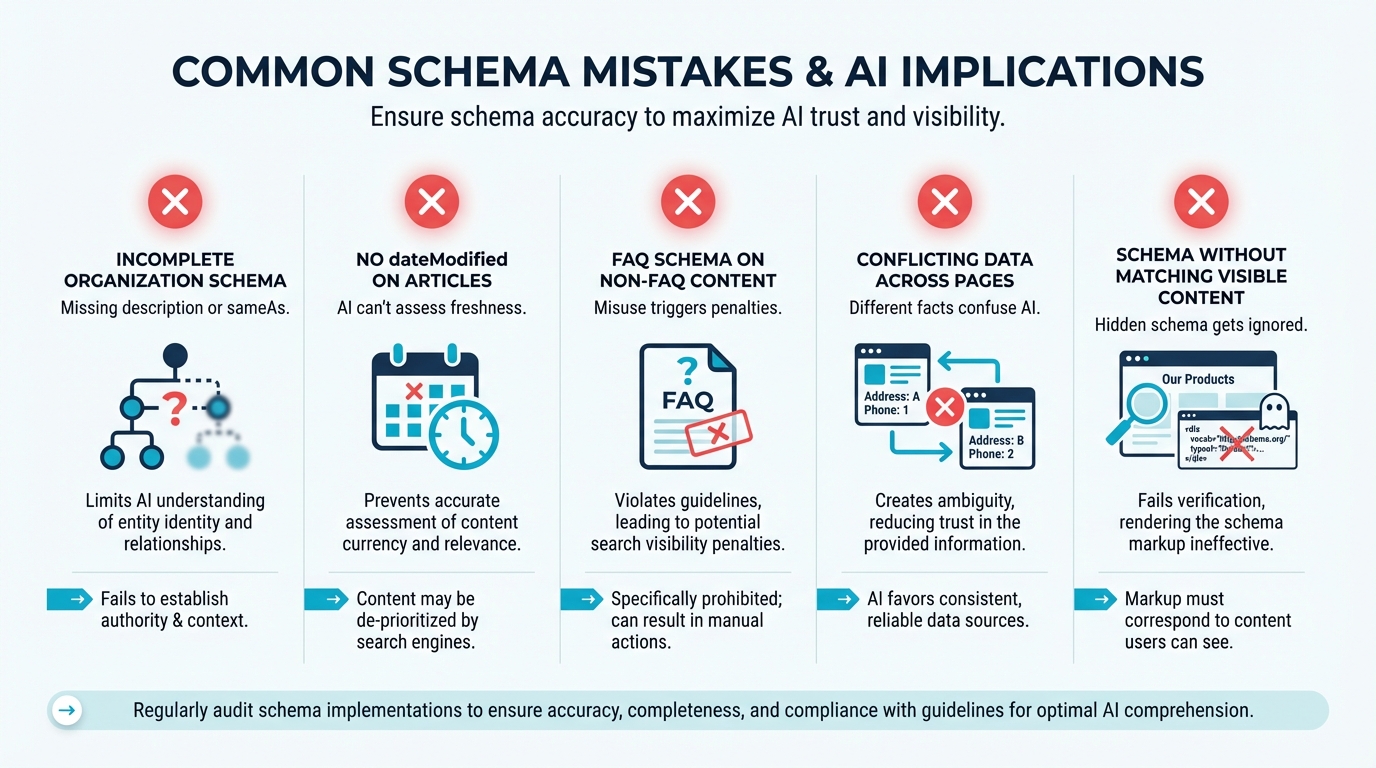
Markup that contradicts the page
If the markup claims something different from the page, systems that cross check may discount it. Keep your Organization description, category labels, and core attributes consistant across the site.
Keyword stuffing in schema fields
Schema fields are not meta tags. Write descriptions for humans first, and keep them factual.
If you would not put teh sentence on the page, do not put it in the JSON-LD.
Misusing FAQPage and HowTo
Given Google’s current limitations, do not add FAQPage or HowTo expecting rich results. Use them only when they accurately describe visible content and you are willing to maintain them like any other on page content block.
Using the right schema type on the wrong page
This often happens with Product schema on top of funnel pages or Article schema on comparison landing pages. Treat schema as a reflection of page intent, not a tool for forcing eligibility.
Only marking up one page
If your site publishes articles, has product pages, and has an About section, consider a consistent baseline: - Organization on your homepage and About page where the org is described - Article on editorial pages - Product or SoftwareApplication on product detail pages - FAQPage on real FAQ pages in your help center
Related Articles
- AEO Explained: The 2026 Guide
- Entity Theory to Market Reality
- How to Improve Visibility in AI Search
CTA: measure how AI platforms describe your brand
If you are working on structured data to reduce ambiguity about your entities, you will usually want a way to check whether that work is showing up in how AI systems talk about you over time. Friction AI is one option for tracking visiblity across multiple AI assistants and comparing outputs as your site changes.